![favicon_GI.png]](https://knowledge.gantner-instruments.com/hs-fs/hubfs/favicon_GI.png?width=40&height=40&name=favicon_GI.png)
What is a UDBF file?
Universal Data Bin File (UDBF) is Gantner Instruments' proprietary high-performance binary file format for storing time-synchronised measurement data. Designed for data acquisition and long-term logging, UDBF combines a compact binary data stream with a self-describing header that contains metadata such as channel names, units, data types, timestamps, sample rates, and scaling information. This structure enables fast recording, efficient storage, and reliable data exchange while allowing software to decode measurement data without additional configuration.
An example UDBF file can be downloaded here.
Refer to this section for information on an existing command-line conversion tool that can be used to convert UDBF files into various output formats.
General file structure
|
Binary data stream |
|
|---|---|
|
Binary Header Data |
Describes the data stream:
|
|
Separation |
|
|
Binary Data |
|
Header
|
Bytes |
Data Type |
Description |
|
|---|---|---|---|
|
1 byte |
Unsigned Integer |
IsBigEndian |
|
|
0 |
IsLittleEndian (like Intel CPUs) |
||
|
<> 0 |
IsBigEndian (like Motorola CPUs) |
||
|
Attention: |
|||
|
2 byte |
Unsigned Integer |
Version |
|
|
2 byte |
Unsigned Integer |
TypeVendorLen |
|
|
1 byte |
Unsigned Integer Array |
TypeVendor |
|
|
1 byte |
Unsigned Integer |
WithCheckSum If Version >= v1.01 |
|
|
0 |
NoCheckSum |
||
|
<> 0 |
WithCheckSum |
||
|
2 byte |
Unsigned Integer |
AdditionalDataLen |
|
|
4 byte |
Unsigned Integer |
Optional: FullMIDStruct part MAIN |
|
|
4 byte |
Unsigned Integer |
Optional: FullMIDStruct part SUB |
|
|
4 byte |
Unsigned Integer |
Optional: FullMIDStruct part FUNCTION |
|
|
4 byte |
Unsigned Integer |
Optional: FullMIDStruct part CASING |
|
|
2 byte |
Unsigned Integer |
Optional: AdditionalDataStructID |
|
|
8 byte |
Double (IEEE754) |
Optional: AdditionalData |
|
|
AdditionalDataStructID = 0 |
|||
|
— |
|||
|
AdditionalDataStructID = 1 |
|||
|
AdditionalData Item 1 = CenterMethod |
4-byte Unsigned Integer |
||
|
Arithmetic = 0 |
|||
|
Geometric = 1 |
|||
|
Manual = 2 |
|||
|
AdditionalData Item 2 = CenterX |
4-byte Float (IEEE754) |
||
|
AdditionalData Item 3 = CenterY |
4-byte Float (IEEE754) |
||
|
AdditionalDataStructID = 2 |
|||
|
LocationLen |
2-byte Unsigned Integer |
||
|
Location |
1 byte unsigned Integer Array |
||
|
SNRLen |
2-byte Unsigned Integer |
||
|
SNR |
1 byte unsigned Integer Array |
||
|
AppVersionLen |
2-byte Unsigned Integer |
||
|
AppVersion |
1 byte unsigned Integer Array |
||
|
UIDLen |
2-byte Unsigned Integer |
||
|
UID |
1 byte unsigned Integer Array |
||
|
AdditionalDataStructID = 3 |
|||
|
XmlRpcValue |
1 byte unsigned Integer Array |
||
|
8 byte |
Double (IEEE754) |
StartTimeToDayFactor |
|
|
2 byte |
Unsigned Integer |
dActTimeDataType |
|
|
8 byte |
Double (IEEE754) |
dActTimeToSecondFactor |
|
|
8 byte |
Double (IEEE754) |
StartTime |
|
|
8 byte |
Double (IEEE754) |
SampleRate |
|
|
2 byte |
Unsigned Integer |
VariableCount |
|
|
Variable Settings |
|||
|
2 byte |
Unsigned Integer |
NameLen |
|
|
1 byte |
Unsigned Integer Array |
Name |
|
|
2 byte |
Unsigned Integer |
DataDirection Attention: if a variable data direction has no Input set, it also is not set in the time/data section. |
|
|
Input |
0 |
||
|
Output |
1 |
||
|
InputOutput |
2 |
||
|
Empty |
3 |
||
|
2 byte |
Unsigned Integer |
DataType |
|
|
No |
0 |
||
|
Boolean |
1 |
||
|
SignedInt8 |
2 |
||
|
UnSignedInt8 |
3 |
||
|
SignedInt16 |
4 |
||
|
UnSignedInt16 |
5 |
||
|
SignedInt32 |
6 |
||
|
UnSignedInt32 |
7 |
||
|
Float |
8 |
||
|
BitSet8 |
9 |
||
|
BitSet16 |
10 |
||
|
BitSet32 |
11 |
||
|
Double |
12 |
||
|
SignedInt64 |
13 |
||
|
UnSignedInt64 |
14 |
||
|
BitSet64 |
15 |
||
|
Old: No – 0, Boolean – 1, Integer (SInt16) – 2, Real (Float) – 3, BitSet8 – 4, BitSet16 – 5, LongInt (SInt32) – 6. |
|||
|
2 byte |
Unsigned Integer |
FieldLen |
|
|
2 byte |
Unsigned Integer |
Precision |
|
|
2 byte |
Unsigned Integer |
UnitLen |
|
|
1 byte |
Unsigned Integer Array |
Unit |
|
|
2 byte |
Unsigned Integer |
VariableAdditionalDataLen |
|
|
2 byte |
Unsigned Integer |
Optional: VariableType |
|
|
Empty |
0 |
||
|
AnalogInput |
1 |
||
|
Arithmetic |
2 |
||
|
DigitalOutput |
3 |
||
|
DigitalInput |
4 |
||
|
SetPoint |
5 |
||
|
Alarm |
6 |
||
|
BitsetOutput |
7 |
||
|
BitsetInput |
8 |
||
|
PIDController |
9 |
||
|
AnalogOutput |
10 |
||
|
SignalConditioning |
11 |
||
|
RemoteInput |
12 |
||
|
Reference |
13 |
||
|
2 byte |
Unsigned Integer |
Optional: VariableAdditionalDataStructID |
|
|
Optional: VariableAdditionalData |
|||
|
VariableAdditionalDataStructID = 0 |
|||
|
— |
|||
|
VariableAdditionalDataStructID = 1 |
|||
|
Data1 |
2-byte Unsigned Integer |
||
|
Data2 |
2-byte Unsigned Integer |
||
|
Data3 |
2-byte Unsigned Integer |
||
|
VariableAdditionalDataStructID = 2 |
|||
|
UIDLen |
2-byte Unsigned Integer |
||
|
UID |
1 byte unsigned Integer Array |
||
|
VariableAdditionalDataStructID = 3 |
|||
|
XmlRpcValue |
1 byte unsigned Integer Array |
||
Separation Chars
There are separation characters (*) inserted. At least 8 pieces and maximal as many as needed so that the next valid data byte is written to a 16-bytes aligned address.
Time/Data
For each data item, a dActTime (configurable data type) is placed at the beginning. The appended data depend on variable settings listed in the header and are repeated for each defined variable.
Checksum
Changed from v1.00 to v1.01. When “WithCheckSum” is set a Checksum (4-byte unsigned integer) is placed at the end of the file. The Checksum is calculated from each byte of the file except the checksum itself. It is the 4-byte unsigned integer summation of mentioned bytes.
Decoding binary data
This section describes how to use UDBF header information to decode the related binary data stream.
The UDBF header information above has to be read, decoded, and stored first to have it available while decoding binary data.
|
Timestamp |
CH1 |
CH2 |
CH3 |
Timestamp |
CH1 |
CH2 |
CH3 |
Timestamp |
… |
|---|---|---|---|---|---|---|---|---|---|
|
1 |
0,12 |
50,2 |
12 |
2 |
0,13 |
50,1 |
12 |
3 |
… |
Decoding the timestamp
The UDBF format always ensures that every frame has absolute time information independent of the timestamp data type. Therefore, the following formula has to be used for every timestamp type:
-
Timestamp * dActTimeToSecondFactor/86400 + StartTime * StartTimeToDayFactor = OLE automation time (double IEEE754)
OLE automation time = time in days since 30.12.1899 0:00:00.000000,
e.g. 2.5 = 1.1.1900 12:00:00.000000
Excel contains an error when calculating dates prior to March 1, 1900
The discrepancy between Excel and Visual Basic only occurs for dates before March 1, 1900. If you repeat the experiment using 3/1/1900 as the test date, both Excel and VB return 61.25. The difference for earlier dates arises because Excel incorrectly treats 1900 as a leap year. For example, in Excel, 2/29/1900 has an OADate value of 60, whereas VB treats 60 as 2/28/1900. Visual Basic uses a different origin date to correct the leap year bug present in Excel while ensuring that current dates produce the same values across implementations.
For more information: http://social.msdn.microsoft.com/forums/en-US/isvvba/thread/747d3fbf-85b5-43f6-b4a5-1de88b0dad2d.
Decoding channel data
Depending on the data type of every channel, length and offset in the binary stream can be determined. A byte swap is necessary for all values with more than 1 byte if the decoding CPU has a different Endian as marked in the header. Integer values have to be divided by 10^ precision.
Revisions
|
Version |
Date |
Comment |
|---|---|---|
|
V1.07 |
2019-02-27 |
* VariableAdditionalDataStructID = 3: added |
|
V1.07 |
2018-10-09 |
Added clear note that additional data has to be ignored in case of unknown (new) structure ID to keep compatibility |
|
V1.07 |
2018-09-07 |
Removed invalid XmlRpcValueLen |
|
V1.07 |
2017-07-01 |
* AdditionalDataStructID = 3: added |
|
V1.07 |
2016-10-03 |
* Some naming changed; |
|
V1.07 |
2015-06-03 |
Some small document layout changes @ section “ModuleAdditionalData” |
|
V1.07 |
2014-03-03 |
Some changes in ModuleAdditionalData structure without changing version (until now not used ⇒ ModuleAdditionalDataLen = 0) |
Convert UDBF file format using Green Eye Converter
To convert existing UDBF (.dat) data to other formats, use the Green Eye Converter developed by APLICA Advanced Solutions GmbH. The tool supports both single-file and batch (directory) conversion and can export to formats such as ASCII/CSV, DASYLab, GED, Famos, MATLAB, UDB, and WAV.
Software License
-
Download and extract the executable from the zip file, note the directory where it is located.
-
Open a command prompt.
-
Change the directory to where the executable is located (e.g. cd c:\users\username\downloads).
-
Enter command: greenconvert_2_82.exe /l Gantner Testlicense 9648865179.
-
It will give confirmation if successful.

Example conversion to ASCII/CSV
-
Note the location of .dat files.
-
Note/create a folder where the converted files will be saved.
-
Open a command prompt.
-
Change the directory to where the executable is located (e.g. cd c:\users\username\downloads).
-
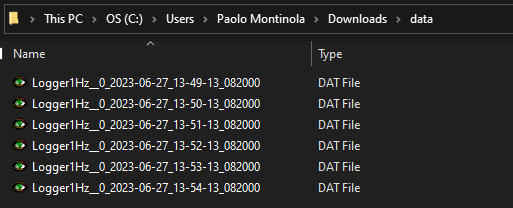
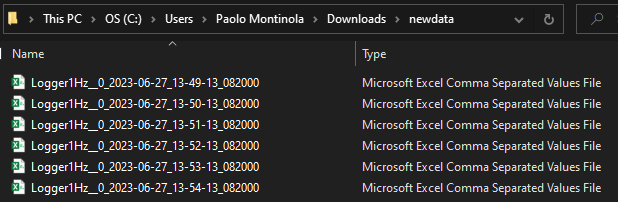
Example batch conversion command: greenconvert_2_82.exe /sd "c:\mydata\source files" /dd "c:\mydata\dest files" /df ASCII

-
"source files" folder is where UDBF files are located
-
"dest files" folder is where converted files will be saved to
-
The software will convert the files in the source directory and convert them and save them to the destination directory.
-
-
Example single file conversion command: greenconvert_2_82.exe /s mydata.ged /d mydata.csv /df ASCII /c my_settings.ges /ac my_ascii_params.cfg
Command line options:
-
/s source_path
-
/d destination_path
-
/sd source directory
-
/dd destination directory
-
/df destination_format (Values: ASCII, DASYLAB, GED, FAMOS, MATLAB)
-
/c curve_settings_path (optional)
-
/ac ascii_config_path (optional)
-
/sel channel_selection_path (optional)
-
/l company name license-code
For files larger than 600 MB, conversion may fail due to the 2 GB memory limit of 32-bit applications. In this case, use the 64-bit version of Green Eye Converter (available on request).