![favicon_GI.png]](https://knowledge.gantner-instruments.com/hs-fs/hubfs/favicon_GI.png?width=40&height=40&name=favicon_GI.png)
Python data acquisition from a Gantner Instrument Q.station uses the GInsData Library and eGateHighSpeedPort API to stream high-speed measurement data directly into Python applications for analysis, automation, visualisation and reporting across industrial testing, structural health monitoring and measurement systems.
What Is Python for Data Acquisition?
Python is a high-level, interpreted programming language designed for readability, simplicity, and versatility. It uses a clear, English-like syntax that makes it easy to learn while remaining powerful enough for professional software development. Python is widely used for web development, data analysis, artificial intelligence, machine learning, automation, scientific computing, and scripting.
The latest releases of Python can be downloaded here: www.python.org.
What is the GInsData Library?
GInsData Library is a software library from Gantner Instruments that provides developers with programmatic access to measurement data acquired by Gantner data acquisition systems. It enables applications to connect to Gantner devices, retrieve live and recorded measurement data, and integrate that data into custom software, monitoring systems, or automated workflows.
The GInsData Library provides a C API, known as the eGateHighSpeedPort API, for directly reading measurement data from Gantner Instruments controllers into Python applications. This API is available as a 32-bit and 64-bit DLL for Windows (giutility.dll) and as a shared library for Linux (libGInsUtility.so).
How to use GInsData Library with Python?
To simplify the use of the eGateHighSpeedPort API, Gantner Instruments provides a Python interface to the required DLL functions. The package is based on Python's ctypes module, which enables applications to call functions in shared libraries by providing C-compatible data types and function interfaces.
For example:
from ctypes import*
import ctypes

# Load DLL into memory, take care to have the corresponding dll available
try:
    GINSDll = ctypes.cdll.LoadLibrary("giutility_x64.dll")
    print("64 bit DLL imported")
except OSError:
    GINSDll = ctypes.cdll.LoadLibrary("giutility_x86.dll")
    print("32 bit DLL imported")

...
# function prototypes: specifying the required argument types
GINSDll._CD_eGateHighSpeedPort_Init.argtypes=[c_char_p,c_int,c_int,c_int,POINTER(c_int),POINTER(c_int)]

# function call:
ret=GINSDll._CD_eGateHighSpeedPort_Init(self.controllerIP,self.timeout,self.HSP_BUFFER,self.sampleRate,byref(self.HCLIENT),byref(self.HCONNECTION))
...
The DLL functions are simplified for ease of use in Python:
# Load Package
import ginsapy.giutility.connect.PyQStationConnectWin as Qstation #module with communication functions to Gantner Q.Station under windows environment

#initialize buffer connection
conn=Qstation.ConnectGIns()
conn.init_connection("192.168.5.24")

#Return some information of the controller
conn.read_controller_name()
conn.read_channel_names()
conn.read_channel_count()

#Call function to store buffer into the variable buffer
buffer=conn.yield_buffer()
GInsData Python API Documentation
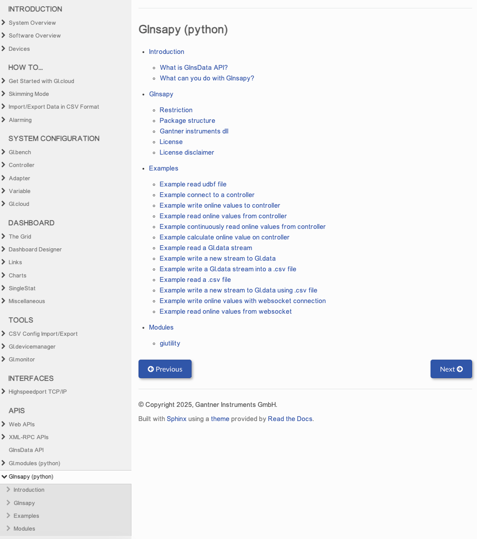
The following examples are part of the package.
-
Read UDBF file (data logger file)
-
Connect to a controller
- Write an online value to a controller
-
Read a data stream
-
Write a data stream
Additional Python Libraries for Data Acquisition
All necessary libraries are automatically installed with the startup script, but can be installed or altered separately through the requirements.txt:
pip3 install -r requirements.txt
Python Data Acquisition Example: Step-by-Step
To run individual example navigate into your Bench installation folder:
C:\Users\Public\Documents\Gantner Instruments\GI.bench\api\Python\examples\ginsapy
To install the package run:
python startup.py
Now you can run individual examples from the src folder with the postfix -h to inspect different arguments. With these options parameters can be set or will use default parameters if left empty.
python "C:\Users\Public\Documents\Gantner Instruments\GI.bench\api\Python\examples\ginsapy\src\example_connect_controller.py" -h
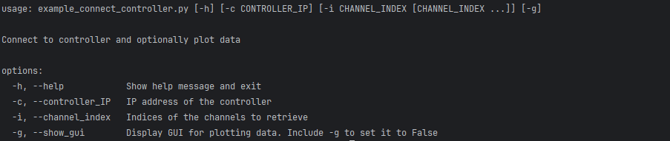
python "C:\Users\Public\Documents\Gantner Instruments\GI.bench\api\Python\examples\ginsapy\src\example_connect_controller.py" -g

Don't forget to configure the appropriate IP address where applicable. Use 127.0.0.1 to access the data buffer of the locally running GI.bench instance, or specify the IP address of a Q.station controller to access the data buffer on that device.
Frequently Asked Questions About Python Data Acquisition
Can I access real-time Q.station measurement data using Python?
Yes. Using the GInsData Library and eGateHighSpeedPort API, Python applications can connect directly to a Q.station controller, read high-speed measurement buffers and integrate the data with scientific libraries such as NumPy and Pandas.
What is the maximum streaming rate of GInsData Library?
GInsData Library supports buffered data streaming of up to 100 kHz, making it ideal for high-speed data acquisition. For live online communication, stable update rates of up to 100 Hz are recommended, depending on the controller, network, and client application. In general, buffered streaming is best for high-speed measurements, while online communication is intended for real-time monitoring and control.
Does GInsData Library work on Linux?
Yes. GInsData Library fully supports Linux on both x86 and amd64 platforms and provides the native shared library libGInsUtility.so. The API offers the same functionality as on Windows, including online data access, high-speed buffered streaming, file transfer, diagnostics, and UDBF file decoding. C++ examples are also provided as Eclipse projects for Linux, making it straightforward to develop and deploy Linux-based applications.
Can I access logged data?
Yes. GInsData Library provides multiple ways to access logged measurement data. You can stream buffered historical data directly from a controller's circular buffer, transfer recorded data files from the controller to a local system, or decode UDBF (.dat) files for offline analysis. The API offers a consistent interface for accessing live, buffered, and stored measurement data across supported platforms.
Can multiple controllers be read simultaneously?
Yes. GInsData Library supports simultaneous connections to multiple controllers, with each controller maintaining its own independent connection. Within a single application, you can also create multiple client instances for the same controller, enabling synchronized data access from different threads or functions. This makes it straightforward to build applications that monitor or acquire data from multiple Gantner Instruments DAQ systems in parallel.