![favicon_GI.png]](https://knowledge.gantner-instruments.com/hs-fs/hubfs/favicon_GI.png?width=40&height=40&name=favicon_GI.png)
Supported Device types and Version
-
G5 Performance
- Firmware Version: G5 Update Package_2026.01.13_2098_1.738.645.702.zip
DownLoad Link
Access to G5 Software
When updating the G5 device, it is important to carry out all updates, also these must be carried out in the given order.
The instructions can be found together with the required files: G5-Update
Note: The latest software is based on .NET 6.
As .NET 6 is only compatible with LabView to a limited extent, please use the previous version “for LabView” based on .NET 4.7 if you use LabView.
First you have to switch to the Advanced User of the G5.Control. Go to Settings ==> User Level... the password is kilowatt then Save and Exit
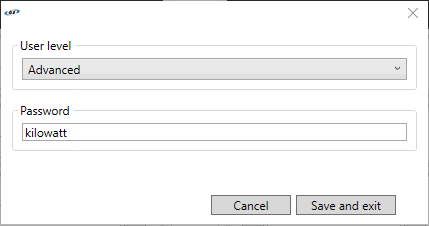
Afterwards update the software and firmware with the corresponding files in the described order:
- G5.Control Software update
-
G5 Firmware update => in a master slave system, the firmware of all devices will be updated
Note: If you use the API update the DLL "Regatron.G5.Api.dll". -
HMI Software (only for devices with HMI)
To document your new settings you can access Device Info.
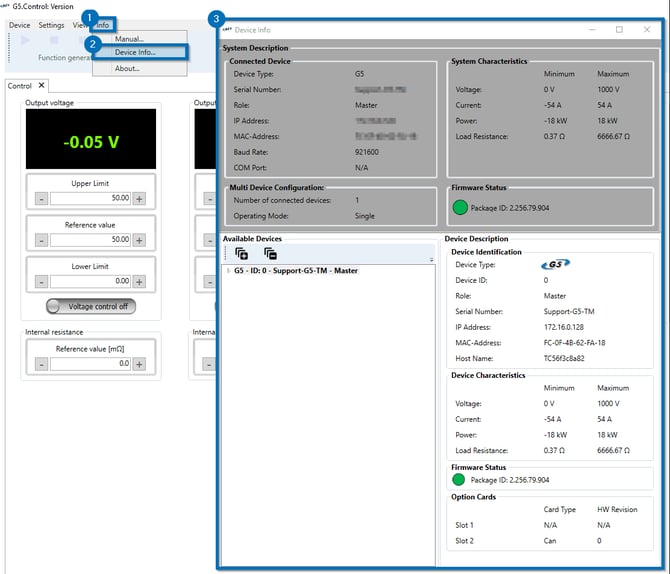
We are looking forward to receiving the screenshot if you have any problems.