![favicon_GI.png]](https://knowledge.gantner-instruments.com/hs-fs/hubfs/favicon_GI.png?width=40&height=40&name=favicon_GI.png)
A Leine Linde ESR strain sensor can send digital strain measurement data to a Gantner Q.station 101 or Q.station X through a Leine Linde CANopen gateway. The Q.station reads the CAN data, while a trigger message on CAN ID 000h initiates continuous measurement data transfer from the sensor.
How the Leine Linde ESR Strain Sensor Measures Strain
The ESR strain sensor from Leine Linde provides digitalized strain measurement data directly into the machine controller or data acquisition system. The sensor is based on an electro-optical rotary encoder in which the signal conversion takes place directly in the sensor and thus the measurement signal contains an extremely low noise even with long cable lengths. With help from gateways, the sensor can provide data via fieldbus interfaces including wireless LAN-based OPC UA. The design also realizes a completely fatigue-free measurement concept, since there is no strain put on the mechanics of this sensor.
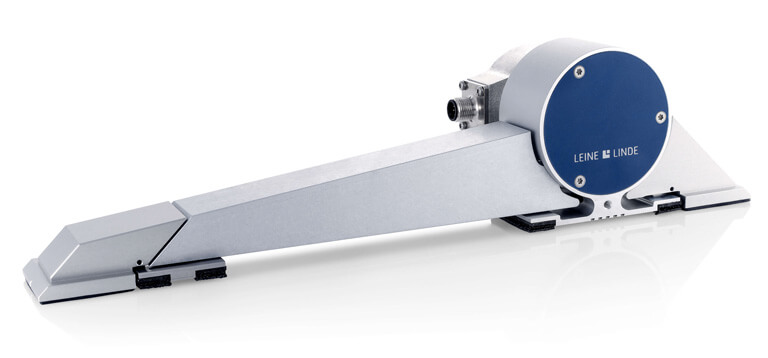
https://www.heidenhain.com/industries/structural-health-monitoring
Connecting the ESR Strain Sensor via CANopen
The ESR strain sensor can be connected to a Q.station 101 or Q.station X via CANopen. This requires the CAN gateway model VGR 4:1 (part no. 1202651-01) from Leine Linde.
For details about the Q.station's CAN interface, please refer to the Q.station manual (for Q.station 101) or the Q.series XL manual (for Q.station X), which can be downloaded from the download area on our website.
For proof of concept, we used a CAN-to-USB adapter on the Q.station side (PCAN-USB adapter from PEAK-Systems Technik GmbH).
Configuring the ESR Strain Sensor in Gantner Software
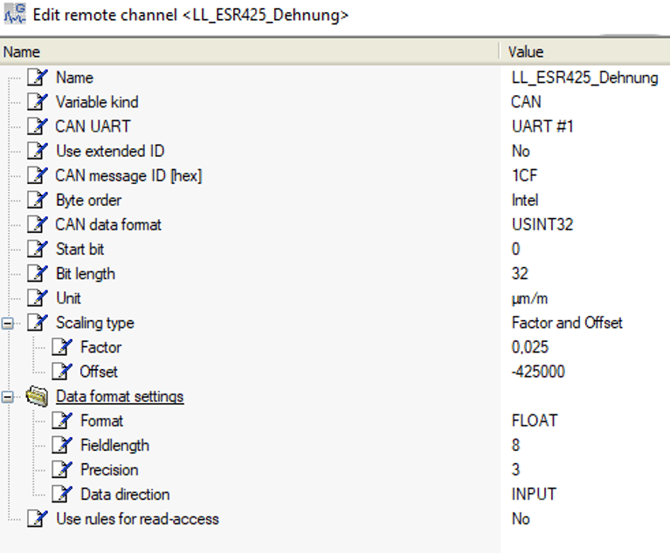
Below are some screenshots of the settings that are required in our system to read the data. For proof of concept, we have used the test.commander software.
CAN input settings to read the sensor data:
CAN output settings to trigger the sensor:

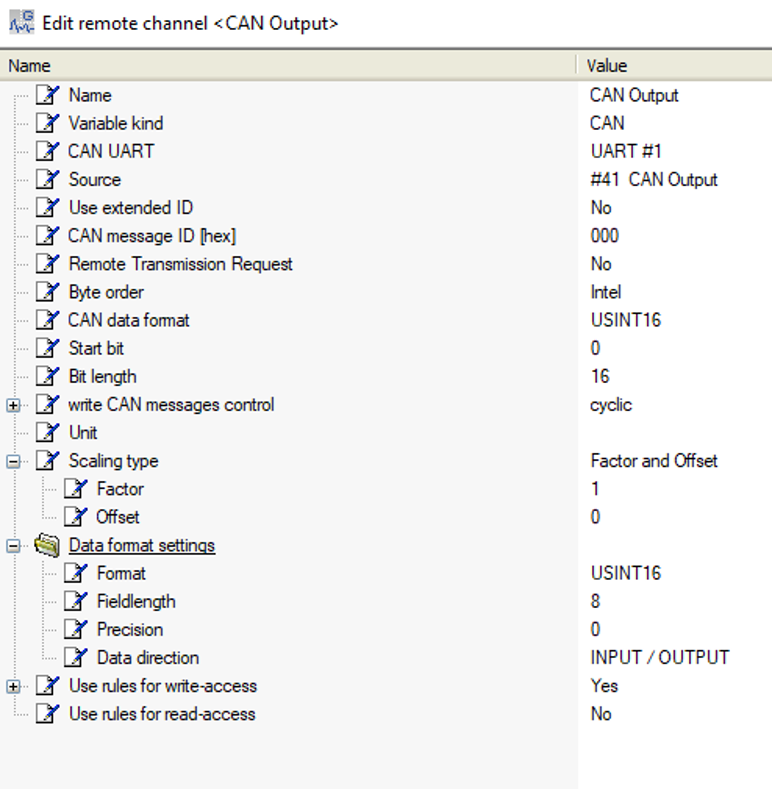
The data sequence 01 0F on CAN ID 000h is required for the trigger. For this purpose, the value 3841 formatted as USINT16 is written to the CAN output. For proof of concept, the trigger was given manually. The trigger can also be generated automatically using for example an arithmetic function or a test.con application.
How the ESR Sensor Communicates via CANopen
Leine Linde has supplied Gantner Instruments with a sensor for proof of concept. Connecting the sensor via a CANopen gateway has been successful and the data stream arrives in our system. The sensor requires a trigger signal to start the transfer of continuous measurement data. Such a trigger can be set up with virtual variables on the controller or test.con, if more advanced logic is required. It would be more convenient for the user if the sensor could be set up in such a way that it does not need a trigger. However, since the gateway from Leine Linde automatically sets itself to the baud rate of the connected bus, and consequently needs a message first, there is no way to get around it.
Frequently Asked Questions About Leine Linde ESR and Q.station CANopen Integration
How do I connect a Leine Linde ESR strain sensor to a Gantner Q.station?
Connect the ESR strain sensor to a Q.station 101 or Q.station X through the Leine Linde CANopen gateway. The current proof-of-concept implementation uses the VRG 4:1 gateway, part number 1202651-01.9
Which Gantner Instruments controllers support the Leine Linde ESR strain sensor?
The documented implementation connects the ESR strain sensor to either a Gantner Q.station 101 or Q.station X through CANopen.
Why does the ESR strain sensor require a CANopen trigger message?
The Leine Linde gateway automatically determines the baud rate of the connected CAN bus and therefore requires an initial message. The documented configuration uses the data sequence 01 0F on CAN ID 000h to trigger continuous measurement data transfer.
What value is used to trigger the ESR strain sensor from the Q.station?
In the documented configuration, the value 3841, formatted as USINT16, is written to the CAN output, corresponding to the required 01 0F data sequence on CAN ID 000h.
Can the Leine Linde ESR sensor trigger be automated?
Yes. The current article explains that the trigger can be generated automatically using controller virtual variables, an arithmetic function or test.con when more advanced logic is required.