![favicon_GI.png]](https://knowledge.gantner-instruments.com/hs-fs/hubfs/favicon_GI.png?width=40&height=40&name=favicon_GI.png)
Gantner Instruments UDBF measurement files can be imported into NI DIAdem using the Gantner DataPlugin. The plugin enables DIAdem to read measurement channels and associated metadata for analysis, visualisation and reporting.
What Is NI DIAdem and How Does It Work with UDBF Files?
DIAdem is an application developed by NI for analysing and post-processing measurement data. DataPlugins enable DIAdem NAVIGATOR to read, inspect, search, and manage measurement data stored in a wide range of proprietary and custom file formats. NI provides free downloadable DataPlugins for many popular measurement data formats, including the Gantner Instruments Universal Data Bin File (UDBF) format.
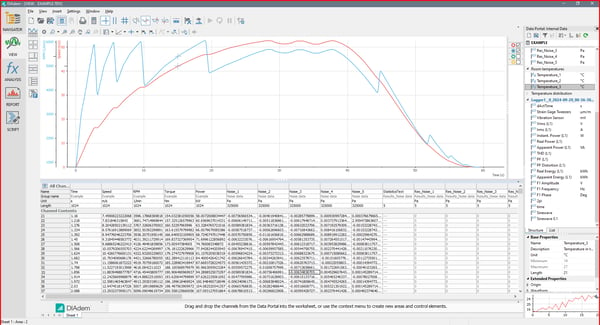 Example with DIAdem 2024 Q2
Why Use NI DIAdem to Analyse Gantner UDBF Measurement Data?
NI DIAdem is a powerful engineering software platform for analysing UDBF measurement data from Gantner Instruments. Using the UDBF DataPlugin, engineers can quickly load large datasets, browse channels and metadata, create advanced interactive visualisations, and perform automated calculations using DIAdem's scripting capabilities. Its comprehensive reporting tools also enable the creation of professional, repeatable test reports, making DIAdem an ideal solution for validating measurement results.
What Is a Gantner Universal Data Bin File (UDBF)?
Universal Data Bin File (UDBF) is Gantner Instruments' proprietary high-performance binary file format for storing time-synchronised measurement data. Designed for data acquisition and long-term logging, UDBF combines a compact binary data stream with a self-describing header that contains metadata such as channel names, units, data types, timestamps, sample rates, and scaling information. This structure enables fast recording, efficient storage, and reliable data exchange while allowing software to decode measurement data without additional configuration.
How to Download and Install the Gantner UDBF DataPlugin for NI DIAdem
You can download the UDBF DataPlugin using the primary download link. If this link is unavailable, use the backup download link.
For more information about installing and using DataPlugins with DIAdem, refer to the NI support website.
How to Fix the “Data Type Not Supported” UDBF Error in DIAdem
For newer Q.station firmware versions, the UDBF file format has been updated. As a result, older versions of the UDBF DataPlugin may report a "Data type not supported" error when opening .dat files.
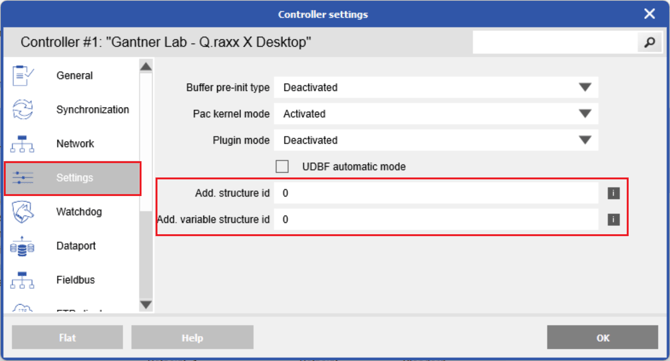
To generate UDBF files that are compatible with older DataPlugins, open the Controller Settings in GI.bench. In the Settings section, clear the UDBF Automatic Mode option, set both Structure ID and Variable Structure ID to 0, and then write the updated configuration to the controller.
Frequently Asked Questions About UDBF Files and NI DIAdem
Can NI DIAdem open Gantner Instruments UDBF files?
Yes. NI DIAdem can import Gantner Instruments Universal Data Bin Files (UDBF) using the official UDBF DataPlugin. Once installed, the plugin allows DIAdem to recognise UDBF files and load measurement channels for analysis, visualisation, and reporting.
Do I need a DataPlugin to import UDBF files into DIAdem?
Yes. The official UDBF DataPlugin is required for NI DIAdem to recognise and import UDBF files. After installation, UDBF files can be opened directly within the DIAdem Navigator.
Can I analyse high-speed measurement data in NI DIAdem?
Yes. After importing UDBF files, DIAdem provides powerful tools for analysing large datasets, including channel calculations, filtering, synchronisation, statistical analysis, frequency analysis, and automated report generation.
Which Gantner Instruments software creates UDBF files?
UDBF files are generated by Gantner Instruments data acquisition systems, including GI.bench data loggers and Q.series controllers. The format is optimised for reliable storage of high-speed measurement data.
Does the UDBF DataPlugin preserve timestamps and engineering units?
Yes. The DataPlugin imports measurement channels together with their timestamps, engineering units, channel names, and other metadata, allowing accurate analysis within NI DIAdem.
Is NI DIAdem suitable for post-processing measurement data?
Yes. NI DIAdem is widely used for post-processing measurement data from laboratory testing, automotive development, aerospace testing, structural health monitoring, and industrial data acquisition. It offers advanced tools for data analysis, visualisation, scripting, and automated report generation.
Can I analyse data from multiple measurement channels simultaneously?
Yes. NI DIAdem supports multi-channel analysis, enabling engineers to compare, synchronise, correlate, and visualise data from hundreds or even thousands of measurement channels within a single project.