![favicon_GI.png]](https://knowledge.gantner-instruments.com/hs-fs/hubfs/favicon_GI.png?width=40&height=40&name=favicon_GI.png)
Error message
Could not create connection to DB.
The program will exit.
Resolution
Step 1: Delete gibench.db file
- Close GI.bench, including the GI.service application running from the system tray
- Then go to the directory: C:\Users\Public\Documents\Gantner Instruments\GI.bench\ and delete the file gibench.db.
- Restart GI.bench. If the problem persists, proceed to step 2.
Step 2: Clean reinstallation of GI.bench
A clean reinstallation will erase existing GI.bench projects. Therefore, before starting the reinstallation procedure, create a backup of the current GI.bench project directory.
-
Create a backup copy of the project directory. The default location is: C:\Users\Public\Documents\Gantner Instruments\GI.bench\projects
-
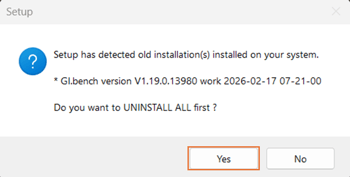
Start the GI.bench setup wizard (GI.bench_Setup_64bit_version_date.exe). When prompted to uninstall the previous version first, click Yes.
-
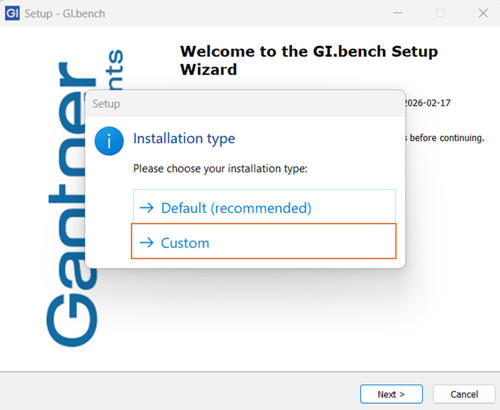
When prompted for the installation type, select Custom.
-
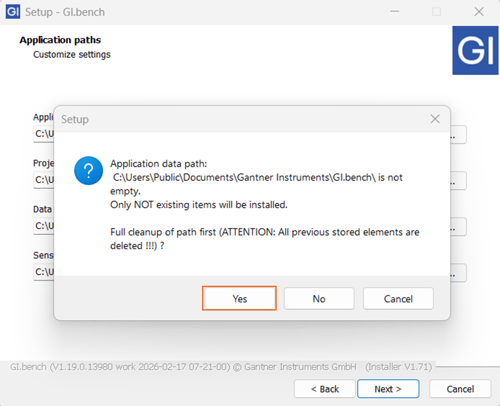
When prompted to overwrite the existing installation paths, click Yes for all.
-
After the installation is complete, copy the backed-up projects directory back to:
C:\Users\Public\Documents\Gantner Instruments\GI.bench\projects - Restart GI.bench to confirm that the error has been resolved.