![favicon_GI.png]](https://knowledge.gantner-instruments.com/hs-fs/hubfs/favicon_GI.png?width=40&height=40&name=favicon_GI.png)
Q.station 101 and Q.station X controllers support hot-swappable USB storage for continuous data logging. Configure two USB storage destinations and select Store to Newly Connected Drive. When a second USB drive is inserted, the controller completes the current logger file before automatically switching subsequent files to the new drive.
Requirements and Compatibility
Before configuring hot-swappable USB storage, make sure your Q.station controller and storage devices meet the following requirements:
| Requirement | Details |
|---|---|
| Supported controllers | Q.station 101 and Q.station X |
| USB ports | Two available USB ports are required to connect the active and replacement USB drives simultaneously |
| Configuration software | GI.bench is required to configure the data logger and USB storage destinations |
| Storage devices | Two suitable USB flash drives are required; industrial-grade USB storage is recommended for continuous measurement and monitoring applications |
| Q.monixx compatibility | Q.monixx does not support hot-swapping between two USB flash drives. It can switch between USB and SD card storage instead. |
The Q.station 101 and Q.station X provide two USB interfaces that can be used for external data storage. With two USB drives configured as storage destinations, a replacement drive can be connected before the active drive is removed, allowing continuous data logging while storage media are exchanged.
How Hot-Swappable USB Data Logging Works
The data loggers on the controller support hot-swapping of USB drives without losing data. To enable this feature, both USB ports on the controller must be available. When a new USB drive is connected, the controller will finalize the current logger file on the active USB drive before switching to the newly connected USB drive for the next logger file.
Do not remove the active USB drive immediately after inserting the replacement drive. Wait until LEDs A and B stop rapidly blinking blue. This indicates that Q.station has finished writing the current logger file and has switched data logging to the replacement USB drive.
How to Configure Hot-Swappable USB Storage in GI.bench
-
Create a data logger on the controller and configure the logger settings according to your application requirements.
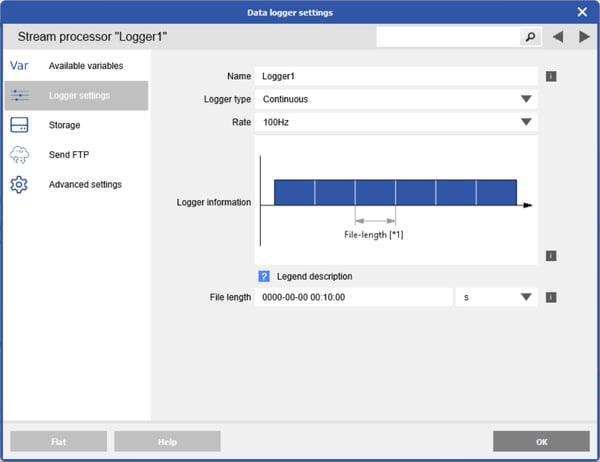
-
Navigate to the Storage settings, set Destination Count to 2, and select USB #1 and USB #2 as the storage destinations.
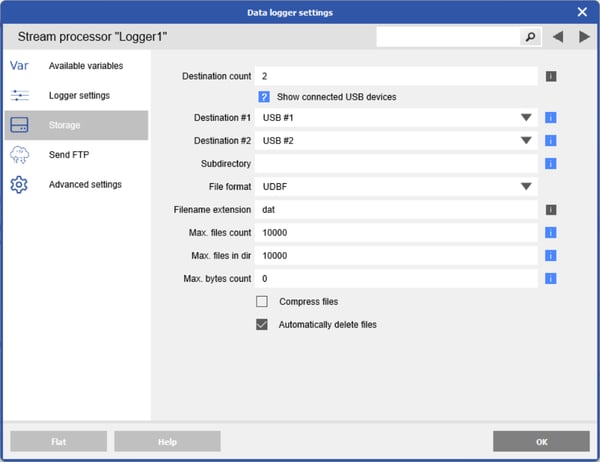
-
Go to Advanced settings and set Storage Mode to Store to Newly Connected Drive.
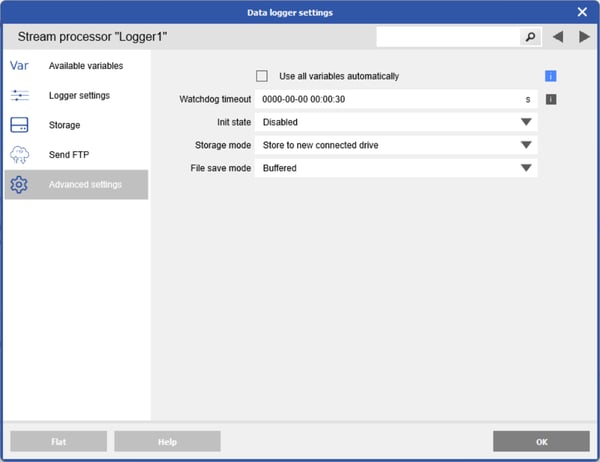
- Write the configuration changes to the controller.
How to Safely Swap USB Drives During Data Logging
After inserting the new USB flash drive, LEDs A and B on the controller will blink rapidly in blue, indicating that writing to the initial USB drive is still in progress. Once the blinking stops, the logger files are now being written to the new USB drive, and it is safe to remove the initial USB drive.
Frequently Asked Questions About Q.station USB Data Logging
Can I hot-swap USB drives on a Q.station without losing measurement data?
Yes. Q.station 101 and Q.station X data loggers support USB hot-swapping. When a new USB drive is connected, the controller completes the current logger file on the active drive before starting the next file on the newly connected drive.
Which Gantner controllers support hot-swappable USB storage?
Hot-swappable USB storage is supported by the Q.station 101 and Q.station X. Q.monixx does not support hot-swapping between two USB flash drives, although it can switch between USB and SD card storage.
How do I configure hot-swappable USB storage on a Q.station?
Create and configure the data logger, set Destination Count to 2 under Enhanced settings, then select Store to Newly Connected Drive and configure USB #1 and USB #2 as the storage destinations. Write the updated configuration to the controller.
How do I know when it is safe to remove the original USB drive?
After inserting the replacement drive, LEDs A and B blink rapidly blue while the controller finishes writing to the original USB drive. Once the blinking stops, logging has moved to the new drive and the original USB drive can be safely removed.
What USB flash drive should I use for Q.station data logging
Gantner recommends industrial/tested storage devices and currently lists options including a Swissbit U-50n industrial USB flash drive. Gantner also recommends the ext3 file system for USB flash drives and SD cards used with its controllers.